24/7
Book clients while your hands are full
It answers 24/7, mid-service, after closing and on your day off, and books callers into real openings on your calendar.
Meet Glo, the AI receptionist that answers when you can’t. Call and try to book
Glownomics answers every call 24/7, books clients into your real openings and texts their confirmation and reminder. The calls you can’t take still end up on your calendar.

Call as if you were one of your clients and ask for a gel manicure this week. Glo checks the open times, repeats the details and books it, just as it would answer your salon’s phone.
A practice salon: no account, no card, nothing is charged.
Glownomics is Canadian software for appointment businesses: a 24/7 AI receptionist that answers calls, books appointments and sends booking texts, plus optional salon operations for walk-ins, technician turns, checkout, tips and payouts.
Salons · Spas · Massage · Car detailing · Appointment services
Your AI receptionist turns the calls and texts you already get into appointments that show up.
24/7
It answers 24/7, mid-service, after closing and on your day off, and books callers into real openings on your calendar.
Every client it books gets a confirmation text right away and a reminder text 24 hours before the visit.
Turn on text-back and a caller who hangs up before booking gets one friendly text from your number, with your online booking link and a way to call back.
Texts to your receptionist number get an answer right away. It answers questions and books, in English, and you can step in anytime.
It checks your live calendar, repeats the details and says “booked” only after your calendar confirms. It answers from the services, prices and policies you approve, and doesn’t make up the rest.
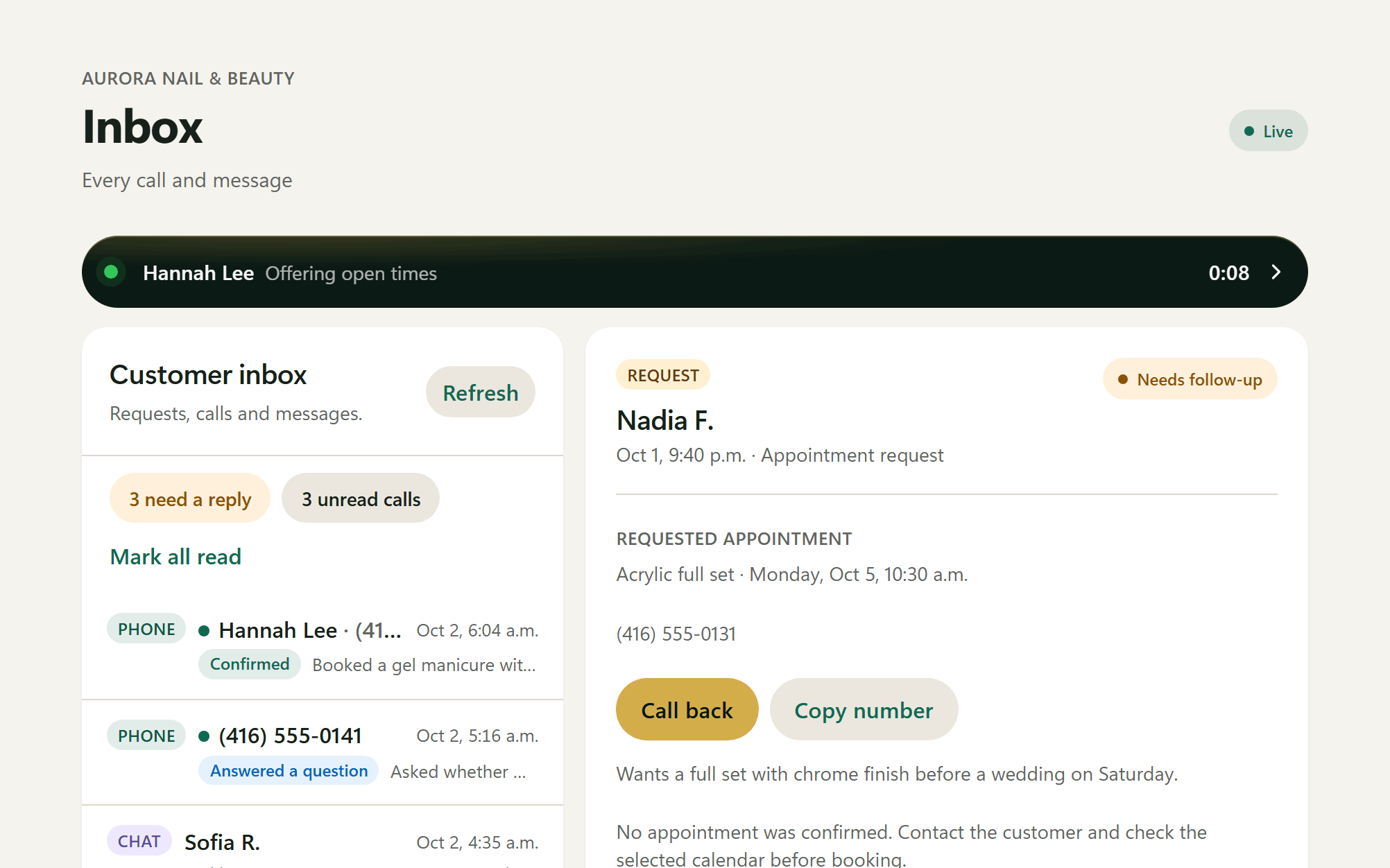
Each call lands in your inbox with its outcome, a summary and the transcript, so you know exactly what was booked and who needs a call back.
Use your own numbers. This is an illustration in listed service value, not profit. It is not a promise of bookings or collected revenue.
About 22 missed calls a month. If 1 in 4 wanted to book, that’s 5 appointments, or CA$3,600 a year in listed service value.
2 bookings a month cover Starter at CA$99
2 bookings × CA$60 = CA$120 in listed service value.
Booking texts go out on their own, from your receptionist’s own number. Clients can reply, and every conversation is in your portal.
The day, time and service in writing, so the booking feels real.
A reminder goes out 24 hours ahead, so fewer clients forget.
Lotus Nails: you’re booked for Sat, Oct 10, 2:30 p.m. Gel manicure. Reply here to ask for a change. STOP to opt out
Reminder · Fri, Oct 9, 2:30 PMLotus Nails: reminder, see you Sat, Oct 10, 2:30 p.m. Gel manicure. Reply here to ask for a change. STOP to opt out
Perfect, see you Saturday!
Callers who hang up before booking get one friendly text with your booking link. Never more than once a week per number, and only between 8 AM and 9 PM.
Clients text back to ask a question, book or request a change. Your receptionist replies in English, and you can take over any conversation.
Booking texts work with the included calendar, Google Calendar, Square Appointments and Wix Bookings. Texts go from your receptionist’s number to North American mobile numbers, and clients can reply STOP at any time. Booking texts and text replies share your plan’s monthly texts: 500 on Starter, 1,000 on Growth, 1,500 on Scale.
Nobody puts down a brush. The receptionist answers, checks real openings and books the caller while your team keeps working. The first call becomes the next visit, not a voicemail.
BookedGel manicure · Saturday 2:30 PM Confirmation texted
The receptionist answers questions about services and prices, offers times that are actually open and books the one the caller picks. The appointment is in your calendar before you open.
Booked60-min massage · Tuesday 10:00 AM Confirmation texted
“Glownomics saves us time and makes everything more transparent for our team. We used to track everything with pen and paper and calculate it manually. Now we can see what’s happening at a glance.”
Trang Timeless Beauty uses Glownomics in live salon operations to validate turns, tickets, tips and weekly payout reconciliation.
Read their storyTrang Timeless Beauty helped shape Glownomics and uses it at no charge.
Add your services, prices, hours and policies, or start from your website. It answers only from what you approve.
Set it up free, talk to it yourself and fix any answer. Nothing answers customers until you press Go live.
Keep your salon number. Forward every call, or only the calls you’re busy for or can’t answer, so your team still picks up first. Phone coverage begins only after the connection is checked and activated.
The receptionist works on its own. Start with its included calendar, or connect Google Calendar, Square Appointments or Wix Bookings. No Glownomics Operations subscription needed. Each outside calendar is checked before the receptionist books into it.
Explore receptionist setupGlownomics is an independent product and is not affiliated with or endorsed by Square. Square, Google Calendar and Wix are trademarks of their respective owners.
Two separate subscriptions. Use the receptionist on its own, or pair it with Owner Pro. At a CA$50 service, two bookings a month add up to more than Starter costs.
AI RECEPTIONIST · No Owner Pro required
CA$99/month
125 connected minutes
500 texts a month
then CA$0.69/minute
Choose StarterCA$198/month
300 connected minutes
1,000 texts a month
then CA$0.64/minute
Choose GrowthCA$297/month
500 connected minutes
1,500 texts a month
then CA$0.59/minute
Choose ScaleEvery receptionist plan includes:
Starting at CA$99/month with 125 minutes; Operations is optional; verified sign-in email alerts at 80%/100%; set up free, choose a plan when you’re ready, and test before you pay.
GLOWNOMICS OPERATIONS
CA$49/month
Calendar, walk-ins, team rotation, Square Terminal checkout, tips and weekly payouts in one place. Up to 25 active accounts.
Start with Operations Try the Operations demo See salon softwareGlownomics Operations picks up where the call ends: the visit, walk-ins and turns, checkout, tips and weekly payouts.
The appointment appears in your Glownomics calendar with the client’s details and the assigned team member. Every call is in your inbox.
Add walk-ins to the wait list and assign guests with the rotation rules you set.
At checkout, send the total to Square Terminal. Square confirms payment and tip; Glownomics keeps the ticket, commission and weekly payout records.
Glownomics OperationsStill unsure? Put Glo to the test on the demo line, or email support@glownomics.com.
No phone menus and no “press 1”. It holds a natural conversation, answers questions and books, using the greeting you choose. If a caller wants a person, it can transfer the call to you or take a message. The fastest way to judge is a test call with Glo on the demo line.
The receptionist uses your approved business information. When a required answer is unavailable, it should not make one up. It says “booked” only after repeating the details and receiving a reference from the live booking system.
Yes. Your phone company forwards calls to your receptionist’s number. Forward every call, or only the calls you’re busy for or can’t answer, so your team still picks up first.
A confirmation right after each booking, a reminder 24 hours before the visit and, if you turn it on, one text to callers who hang up before booking. Texts go from your receptionist’s number to North American mobile numbers, and clients can reply STOP at any time. You can switch each kind of text off in Settings.
Set up free. Choose a plan when you’re ready. Test your receptionist before you pay. Nothing answers customers until you press Go live. For Owner Pro, the app shows the plan and billing terms before payment.
No. Calls continue and overage is metered by connected seconds: CA$0.69/minute on Starter, CA$0.64 on Growth and CA$0.59 on Scale. Email alerts are sent to the verified sign-in address at 80% and 100%.
No. Owner Pro is CA$49/month for the business, with up to 25 active accounts. The AI receptionist is a separate service from CA$99/month and does not require Owner Pro. It works on its own with its included calendar, or connects Google Calendar, Square Appointments or Wix Bookings once that connection passes its setup check.
Routine calls are not recorded and no audio is kept. Callers hear that the call is transcribed; Glownomics stores the text transcript, a structured outcome and a summary for 30 days so you can follow up.
No. Glownomics is designed for appointment-based services, including hair and nail salons, spas, massage therapists, car detailing and independent professionals. Set up your own services, hours and policies.
Call Glo as if you were a client and hear it book your appointment. Then set up your own receptionist free and test it before you pay.
The receptionist knows the Glownomics Demo Salon's services, prices, technicians and hours. It checks current availability, confirms the guest's choice and writes the appointment to the dedicated demo calendar. English demo · by phone or in your browser · no payment · demo calendar only. It sends no customer notifications and takes no payments.